Brand Explorer: see how ChatGPT and Gemini answer about your business
Brand Explorer is Qelvra's tool for seeing what ChatGPT and Gemini say when your buyers ask for a recommendation. It asks buyer questions, then shows whether the answers name your business, which competitors they name instead and which websites they cite. Each scan is a sample of AI answers at one moment, and once you have two or more you can compare them.
- Want a quick first look? Use the free check: 5 questions to ChatGPT, no sign-in.
- Want to compare yourself with rivals across two AIs? Run a full scan in the app.
- Want to know whether AI crawlers can read your site at all? Use the AI Visibility Checker.
Which part of SEO it helps
Brand Explorer covers answer engine optimisation (AEO): whether AI assistants such as ChatGPT and Gemini name or cite you when someone asks for a recommendation. New to AEO? Start with AEO vs SEO.
When to use it
- You want a first look at whether ChatGPT names you at all.
- You want to know which competitors AI names instead, and which sites it relies on.
- You have changed your site and want to compare a new sample with an older one. Changes can take a few weeks to show up in AI answers, so scanning every day tells you little.
Free check vs full scan
| Free check | Full scan | |
|---|---|---|
| Who can use it | Anyone, with no sign-in, at /tools/brand-explorer | Pro (3 a month), the free trial (1 scan in total), Ultra (6 a month) and Agency (no monthly limit) |
| What it asks | 5 questions, one ChatGPT answer each | 20 questions, plus up to 5 of your own, each asked to ChatGPT and Gemini |
| Languages | Mostly English, plus Hindi and Hinglish (Hindi written in English letters) | English, Hindi or Hinglish, chosen on your first scan; English is ticked at first, and the choice is kept |
| Where the result is | On the page | In the app at Brand Explorer, where every report is kept |
| How long | About a minute | Usually a few minutes, at most about 10. You can leave the page |
| Cost | Free | Credits, always shown and approved first |
Free and Starter accounts can use the free check and read saved reports, but cannot start a full scan. To start one you need at least 6 credits available. They are held while the scan runs, and whatever the scan does not use goes back. Each site can run one scan at a time.
How to use it
The free check
- Open the free check.
- Type your website address, for example
yourbrand.in, and press "Check AI answers". The result appears in about a minute.
A full scan
- Open Brand Explorer in the app. It scans the site selected in the sidebar.
- On your first scan, tick the languages your buyers use and press "See the questions". Qelvra reads your homepage and writes them. This takes a few seconds and uses no credits. Later scans start with "Scan again".
- Under "Here's what we'll ask", read the list. You can reword any question. Under "Want to add your own?" you can add up to 5 of your own. Questions that name your brand are refused, because AI would nearly always mention you and the result would look better than it is.
- Below the list, a card ("Run this scan?") shows the number of questions and answers and the credits. Press "Approve and scan" to start, or "Cancel". The button stays off while a question is half-edited or half-typed.
- The page then shows "Your scan is running". You can leave it and come back in a few minutes: the report will be there.
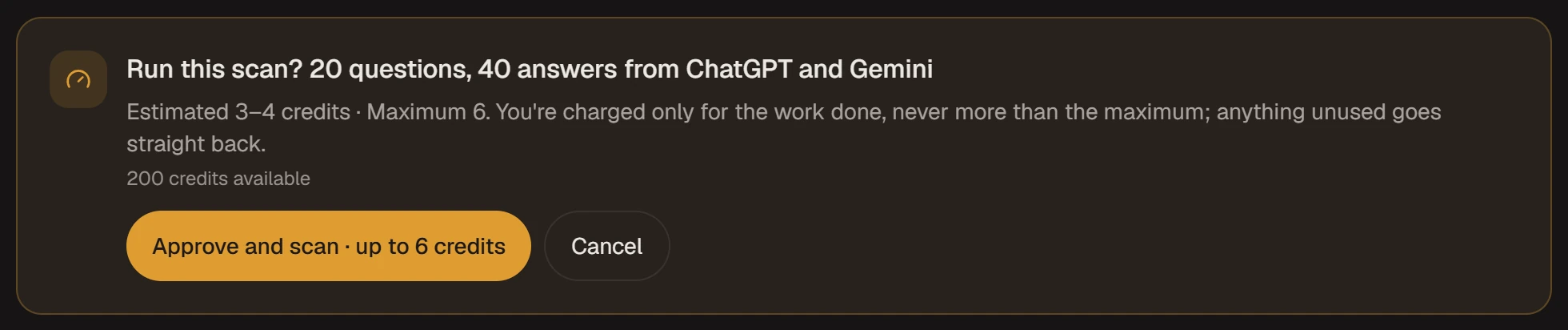
The approval card for a first scan of 20 questions.
Later scans reuse the same questions so reports can be compared. A question you reword leaves the comparison with earlier scans.
What you'll see
The questions are written from your homepage, as a buyer in India might ask them. They are generated, not real conversations, so the results are samples.
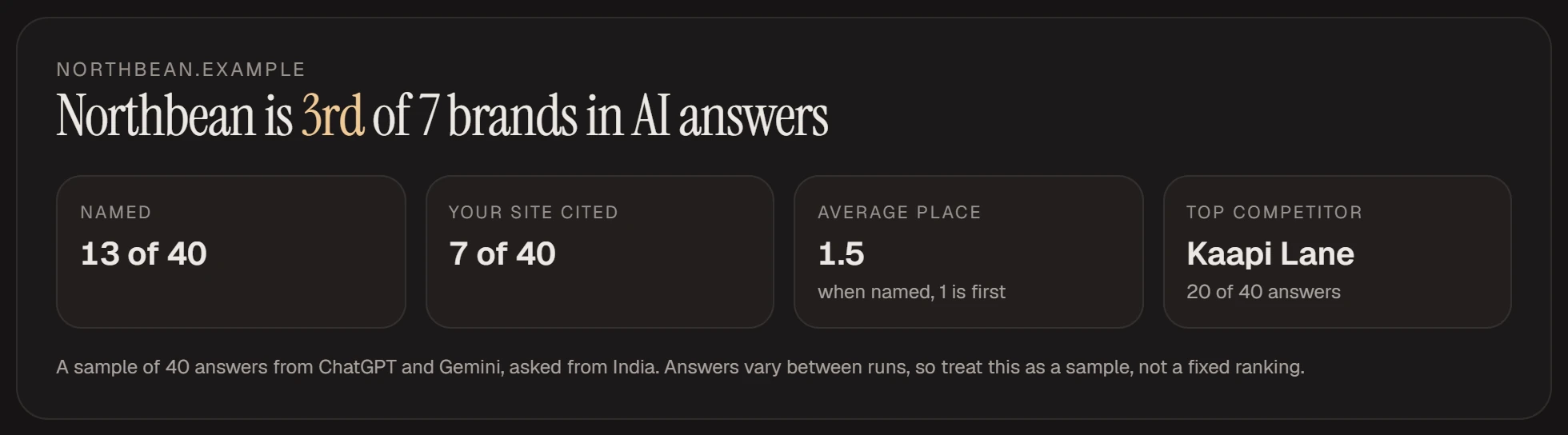
Example data: Northbean and its rivals are made-up brands.
The headline says either "Northbean is 1st of 12 brands in AI answers" or "Northbean isn't named in these AI answers", with your brand in place of Northbean. The rank is among the brands named in the sampled answers. Under it are four tiles:
- "Named": in how many answers the text mentions your brand.
- "Your site cited": in how many answers your website is listed among the sources the AI used. You can be named without being cited.
- "Average place": your position when named. 1 is first, so lower is better. It counts only the answers that name you.
- "Top competitor": the brand named most often, and in how many answers.
The "Report from" menu picks which scan you are reading. The "Filter by AI engine" and "Filter by language" buttons narrow every number below them to one AI or one language.
Who AI names most
Brands listed by how many sampled answers name them. Small gaps do not mean much, because answers change between runs.
Biggest gaps
Up to five questions where an AI answered without naming you, and who it named.
Questions and competitors
"Choose a view" switches between "By question", "By competitor" and a grid. "By question" shows each question and, for each AI, the brands named. Press "Read the answer" to read the AI's own text. "By competitor" shows where each rival appears with and without you.
Where you're left out
Sites and pages cited in answers that left you out, with the questions and topics involved. Your competitors' own sites aren't listed. The "Compare with" menu sets it against an older report.
Change across your scans
This appears once you have two or more reports. A line chart shows how often sampled answers name you and your top rival, across up to the latest 6 scans. It compares only answers that every one of those scans has, from the same AI to the same question. These are samples you ran yourself.
What to expect
- Answers vary between runs. Two scans a day apart can differ without anything having changed.
- Only ChatGPT and Gemini are asked, from India. Other assistants and other countries are not covered.
- Brand names are picked out of the answers by software, so a competitor in the list may occasionally not be a brand.
- If fewer than half of the answers come back, the scan fails and nothing is charged. If at least half come back, the report is made and says how many did not.
- Nothing here guarantees that a scan or a fix will get you named.
Cost
The free check uses no credits. A full scan shows an estimate of 3 to 4 credits and a maximum of 6. You pay for the work done, never more than the maximum. A finished report shows "This scan used N credits". A scan that fails is not charged and does not count towards your scans.
Pro and Ultra scans are counted by calendar month in India time and come back on the 1st. The free trial's scan does not come back; pick a plan to run more. When your scans are used up, or your plan has none, you can still read old reports, but you cannot start a scan or change your questions.
What to do with your result
| What the report shows | What it usually means | First thing to do |
|---|---|---|
| Not named, not cited | AI doesn't connect you with these topics yet | Pick one or two questions from "Biggest gaps" and publish a page that answers each one in its opening sentences. Run the AI Visibility Checker to rule out blocked crawlers |
| Named, but your site isn't cited | AI knows you from other sites, not your own | Put a direct, quotable answer to those questions on your site |
| Cited, but not named | AI reads your page but recommends others | Make your brand and what you sell explicit on the cited page |
| Named, but an average place well above 1 | You're on the list, not near the top | Go after mentions on the sites in "Where you're left out" |
| One rival in most answers | It's present on the sources AI uses | Open "By competitor" under "Questions and competitors" and see where it appears without you |
These are starting points, not promises: whether an assistant uses what you publish is up to the assistant.
After the report
Investigate with the agent
This opens a chat with the report attached and asks the agent to explain what to do first. It shows a credit estimate and asks for your approval before it starts.
Action plan tasks
When a scan finishes, Qelvra turns the biggest gaps into cards on your Action plan at no cost: up to 7 questions that every AI answered without naming you (or answered by citing your site without naming you), the most-searched topics first, and up to 3 sites to get mentioned on. They read "Get Northbean mentioned on example.com" or "Answer 'best coffee beans online' on your site", with your own brand, sites and questions, and a question card says how often its topic is searched on Google in India when that number is known. While 10 are open on a site, a new scan adds no more. For a site task, the agent can draft a pitch for you to send. For a question task, you can ask the agent to help write the page. It sends nothing for you, and anything that would change your site needs your approval first.
Share a report
The "Share" button makes a read-only link and copies it. Anyone who has the link can read that report, the full text of its answers and any questions you added, without signing in. The link does not expire. Search engines are told to skip it, but anyone you send it to can forward it. "Stop sharing" switches it off, and the old link then shows "not found". If you share again you get a new link.
The AEO playbook
See "AEO — get cited by AI" in Playbooks.
Try it in chat
- Why am I missing from my latest Brand Explorer report?
- Which sites do AI answers cite most in my market?
Frequently asked questions
Is Brand Explorer free?
The free check is. A full scan uses credits: an estimate of 3 to 4, never more than 6, and you approve it first.
Can I see how my brand's mentions change over time?
Yes. Once you have two or more scans, the report compares them, with a chart of how often answers name you and your top rival across your latest 6 scans.
Which AI assistants does it check?
ChatGPT and Gemini, asked from India. Perplexity, Claude, Google AI Overviews and other countries aren't covered.
How often should I scan?
A few weeks after you change your site. Changes take time to show up in AI answers, and daily scans tell you little.
Can I change the questions?
Yes, while your plan can still run a scan. You can reword any question and add your own, up to 5. Only questions you added can be removed. If your scans are used up or your plan has none, questions are locked until you can scan again.
How is this different from the AI Visibility Checker?
The AI Visibility Checker tests whether AI crawlers can reach and read your site. Brand Explorer asks AI assistants buyer questions and shows what they answer.
Will fixing the gaps get me named?
We cannot promise that. A page that answers a question directly, or a mention on a site AI cites, gives AI something to use. Whether it does is up to the assistant.